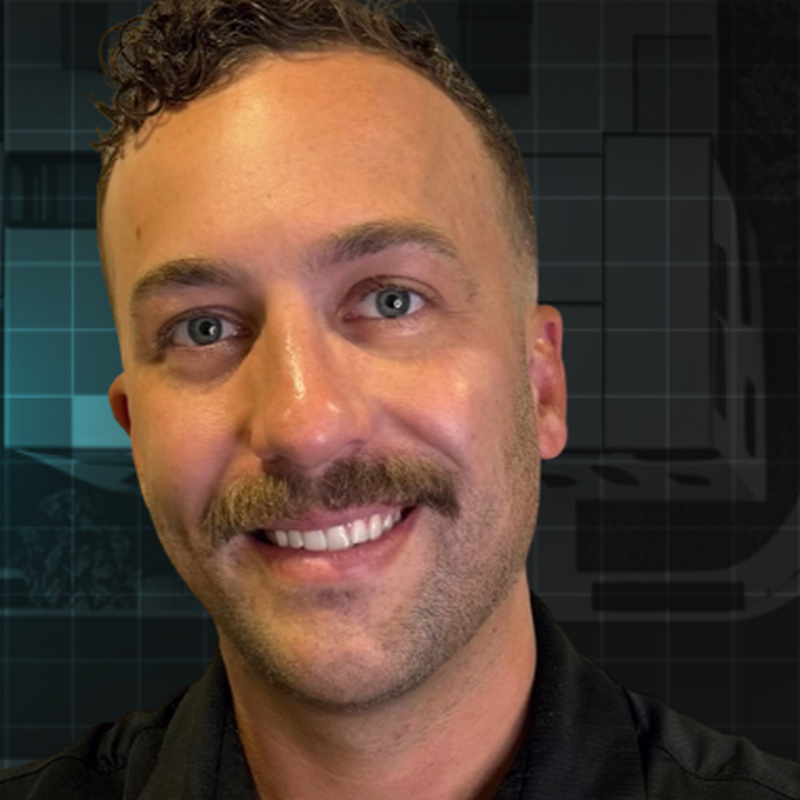
Guide / By Rob Lowry, Founder of LaunchEngine

Published 2026-06-10 / Updated 2026-06-10

AI for Property Maintenance Operations

A practical reference for PMCs running maintenance on AppFolio, Buildium, or Rentvine. Walks a real ticket end-to-end. Names the jobs an AI operation does. Maps which systems get touched. Ends with the metrics that prove it is working.

your-pm-company.monday.com
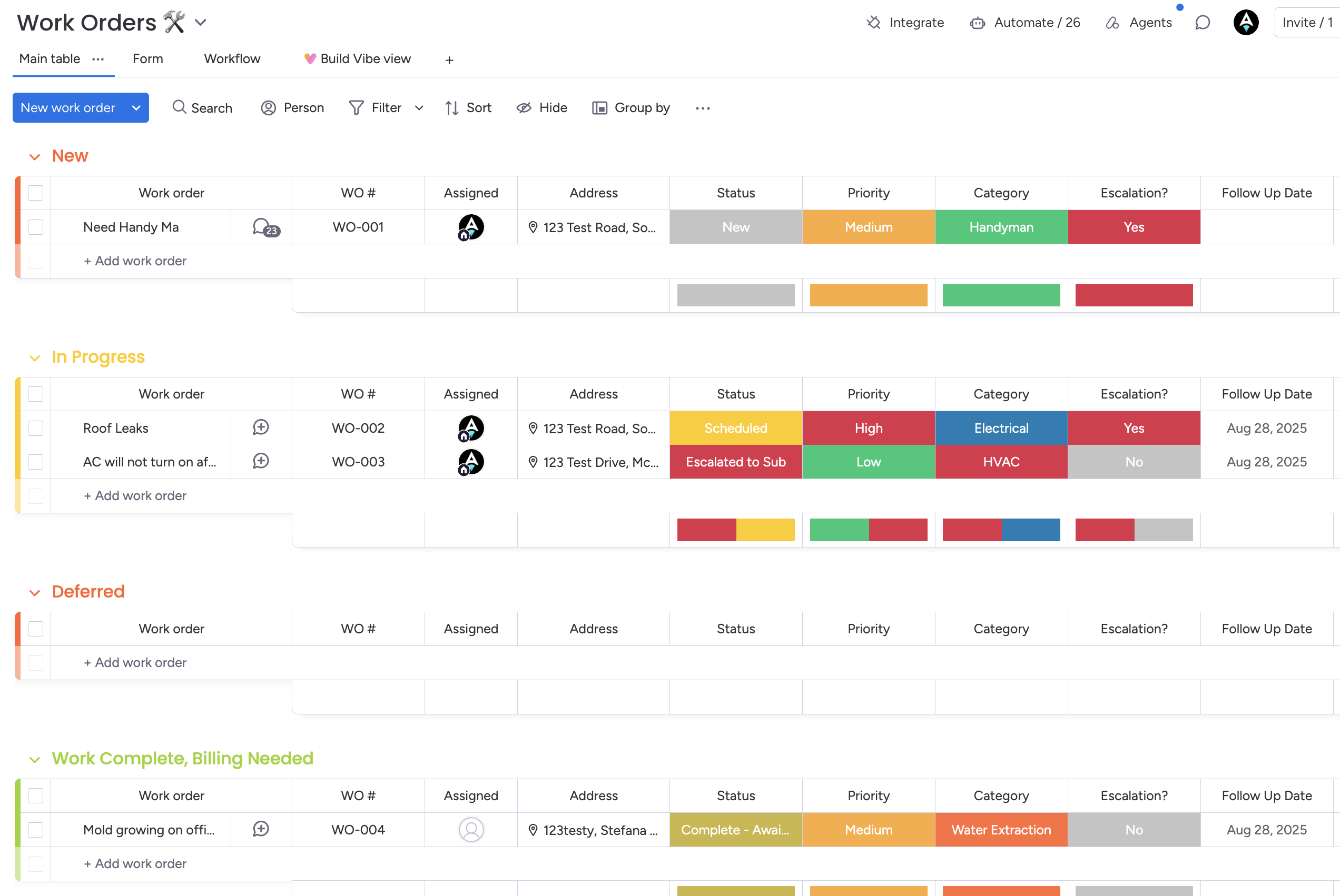
A property management Work Orders board on monday.com, grouped by status (New, In Progress, Deferred, Work Complete Billing Needed). Rows show work order number, assigned tech, property address, status, priority, category (Handyman, Electrical, HVAC, Water Extraction), escalation flag, and follow-up date.

The board your team operates on / Maintenance lives on the same workspace your dispatcher already opens

01 / Summary

Key takeaways

  1. 01Maintenance is the highest-volume workflow most PMCs run. It is the right first AI workflow because the pain is daily, the cycle times are measurable, and the after-hours load is real.
  2. 02A real ticket touches the resident, the PM, the vendor, the owner, the accounting ledger, and the visibility layer. Single-system AI cannot run it. Cross-system orchestration is the bar.
  3. 03An AI maintenance operation does specific jobs: pre-ticket troubleshooting, classification, vendor dispatch, owner approval gating, photo verification, invoice intake, closeout, owner reporting.
  4. 04Done right, a one-ticket workday for the PM collapses to a few one-tap confirmations. The agent does the typing and the chasing. Humans gate the judgment calls.
  5. 05Verification is non-negotiable. Photo comparison and structured email parsing are what stop a vendor-said-done from closing a ticket where the work did not actually happen.

02 / The setup

Why maintenance is the right first AI workflow

Maintenance is the highest-volume workflow most PMCs run. It is the one a 200-door portfolio does daily and a 3,000-door portfolio does hundreds of times a week. The pain is constant. The cycle times are measurable. The after-hours load is real.

It is also the workflow that touches the most systems in your stack. A single ticket exercises the PMS, communications with the resident, the vendor, the owner, your accounting ledger, file storage for photos and PDFs, and the visibility layer your team works on.

That is why it is the right first workflow to encode and run with AI. The pain is daily, the ROI shows up fast, and the cross-system orchestration you have to build for maintenance is the foundation you will reuse for renewals, move-ins, move-outs, AP, and owner reporting later.

03 / Manual cost

Where the time goes when you run maintenance by hand

Six places PMs spend hours per ticket today. An AI operation collapses each of them.

01

After-hours coverage
A meaningful share of resident maintenance contact happens outside business hours. A live PM means a paged manager or a delayed reply. An AI agent picks up the moment the chat opens.

02

Triage time per ticket
Categorize, set priority, suggest a vendor, write the summary, link the unit and lease, post the resident chat as context. Minutes per ticket times daily volume.

03

Drafting + sending comms
Every ticket fires off at minimum a resident scheduling email, a vendor dispatch, an owner approval, a vendor confirmation, an invoice reminder, and a resident closeout. Six drafts the PM no longer types.

04

Reading vendor replies
Vendor reply hits the inbox. Someone has to read it, extract the dollar amount, find the schedule date, decide if owner approval is needed, and update the right columns.

05

Photo review
Pre-work and post-work photos sit on the ticket. Confirming the right fixture, spotting safety hazards, comparing before-and-after, is human work unless the agent does it.

06

Owner reporting
Final PDF report. Cover page, problem, triage history, pre/post photos, closeout, full activity log. Manual assembly takes hours per ticket.

04 / Anatomy

A real ticket, end to end

Friday afternoon. Resident opens the maintenance chat. The agent goes to work. Here is every step the operation runs before the ticket closes Saturday morning.

  1. 01

    Resident contact

    Resident opens the maintenance chat on the portal. The agent picks up before a work order exists, classifies the issue, walks through the known fix attempts for that class of issue, and either resolves it or escalates with the full context preserved.

  2. 02

    Ticket creation, already triaged

    Item appears on the maintenance board. Classification, priority, linked unit, linked lease, the original problem, the troubleshooting log, and the full chat transcript are all pre-filled. The form-path triage agent skips when the chat-path agent has already handed off.

  3. 03

    First resident reply

    Status moves to awaiting resident info. The comms agent drafts and sends a scheduling email asking for availability windows and access notes, in your voice. The same message is posted as an update on the item.

  4. 04

    Vendor dispatch

    Status moves to initial dispatch. The comms agent drafts and sends the vendor email with property, unit, resident contact, what the resident reported, what was already tried, and the ask for estimate plus earliest schedule date.

  5. 05

    Inbound parse

    Vendor replies. The inbound-email agent matches the reply to the right work order, classifies the sender, extracts the dollar amount and the schedule date, writes them to the columns, and flags the suggested next status.

  6. 06

    Owner approval gate

    If the amount exceeds the property's reserve, the comms agent drafts the owner approval email but holds the send. The draft sits on the item as a gated update for a human to confirm with one word or one tap.

  7. 07

    Approval relay

    PM confirms. The coordinator agent fires the gated email. Owner replies. The inbound parser reads the reply, sets the owner-approval column, and the comms agent fires the vendor-proceed email.

  8. 08

    Verification

    Vendor arrives, takes a pre-work photo, uploads it. The photo agent validates fixture and condition. Vendor completes the work, uploads the post-work photo. The photo agent compares pre and post, confirms the fix, checks for new damage.

  9. 09

    Closeout

    Invoice arrives. Inbound parser ticks the invoice-available column and suggests closed status. PM confirms. The comms agent sends the resident closeout. The photo agent assembles the owner PDF and emails it. Item collapses into the closed-tickets view.

Total active PM time on the happy path: one typed comment to release the owner email, two taps to confirm suggested statuses. Everything else is the agent.

Two of the artifacts the agent produces on this ticket

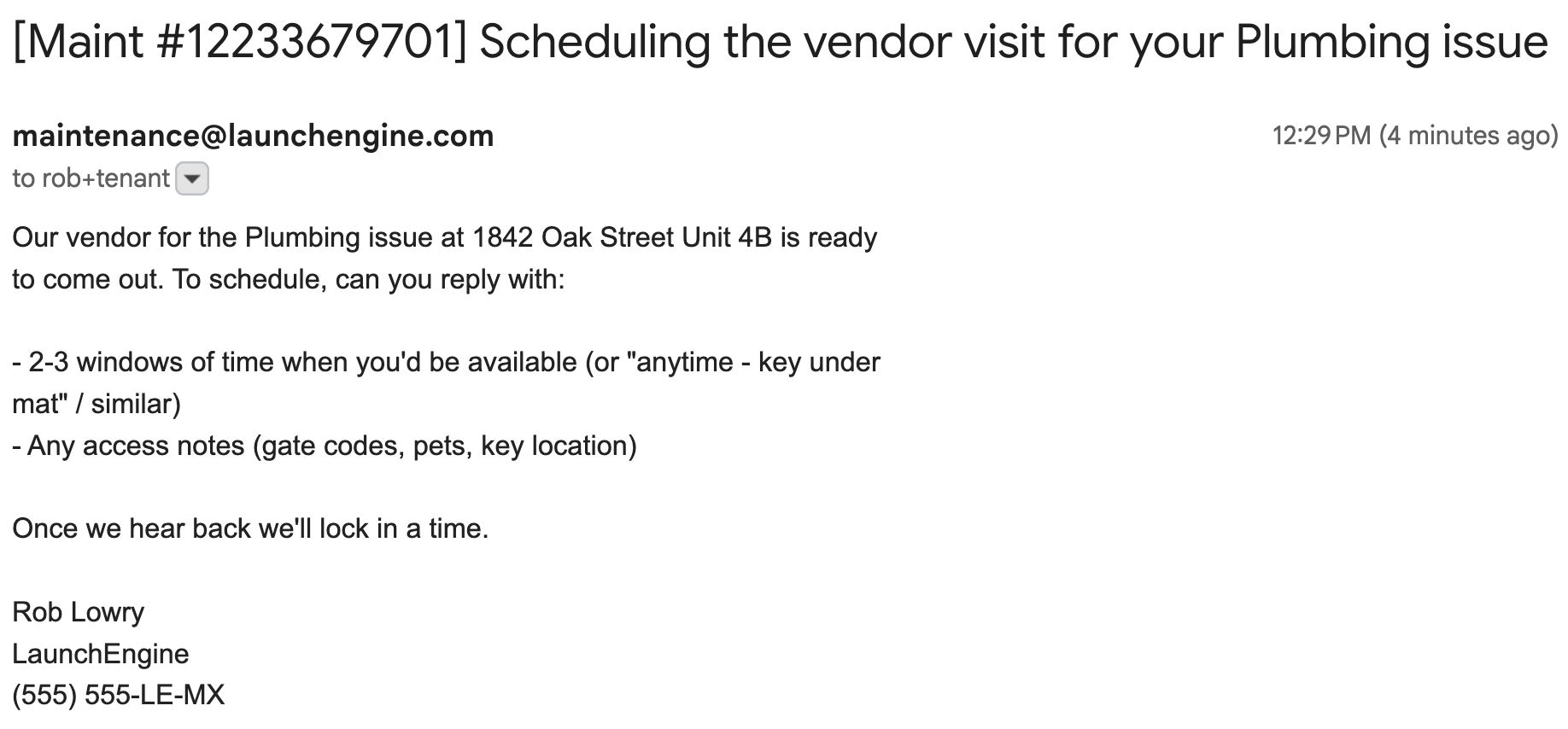
Resident scheduling email drafted by the agent and sent to Sarah Mitchell, asking for availability windows and access notes for the plumbing visit at 1842 Oak Street Unit 4B.
Resident scheduling email (Gmail view)
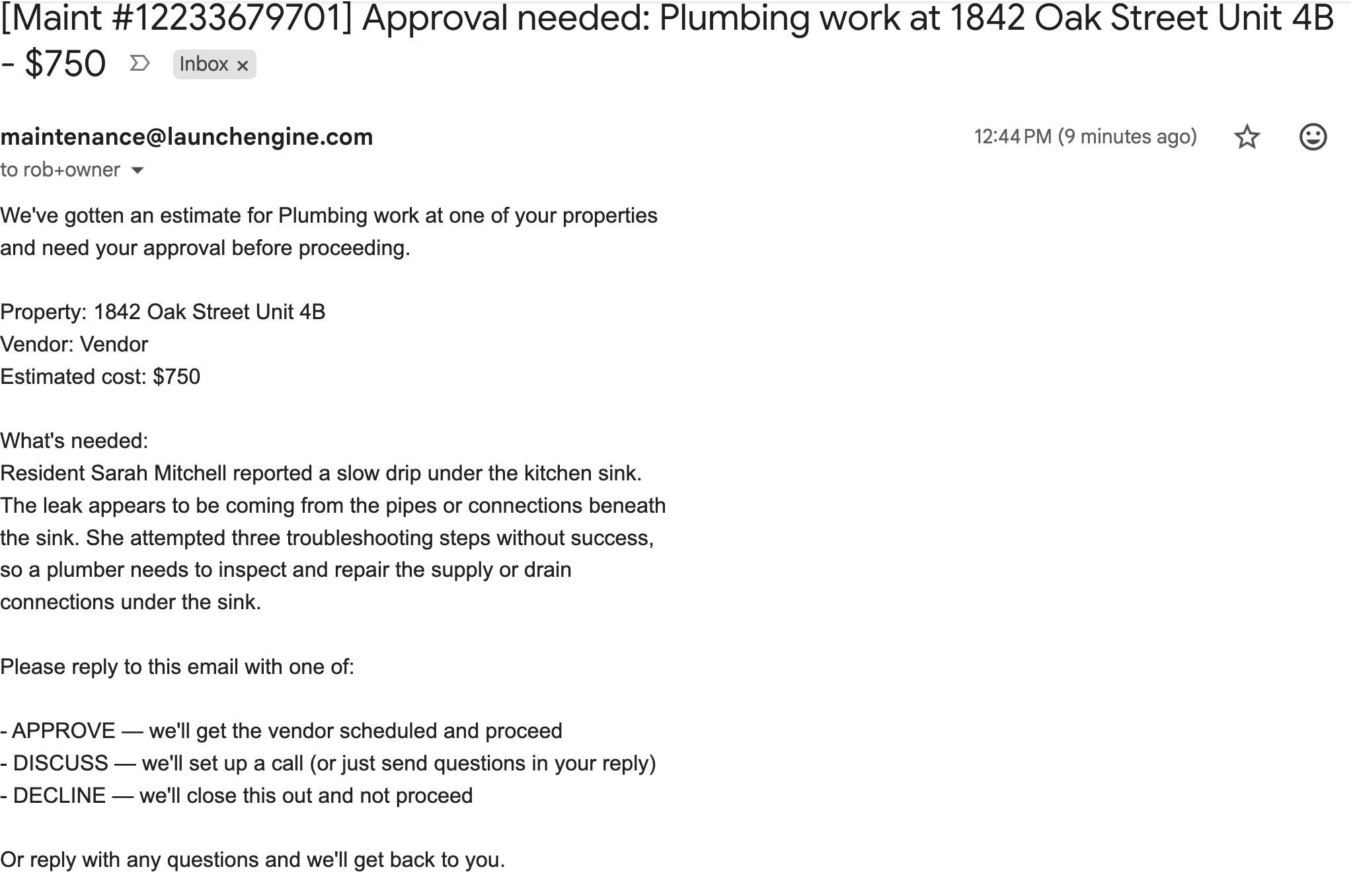
Owner approval email sent on a $750 vendor estimate at 1842 Oak Street Unit 4B, with one-click APPROVE, DISCUSS, and DECLINE buttons.
Owner approval email with one-click APPROVE / DISCUSS / DECLINE

05 / Ensemble

The agents and what each one does

Single-purpose agents, each accountable for one slice of the workflow. The choreography across them is the operation.

01

Pre-ticket troubleshooting

Troy

Chats with the resident on the portal before a work order exists. Classifies the issue, walks the resident through the proven fix attempts for that issue, and either resolves on the spot or escalates with the full chat transcript and the classification preserved.

02

Form-path triage

Maxine

Triages any ticket that bypasses the chat and arrives via form or email. Categorization, priority, suggested vendor, summary for the PM. Skips automatically when Troy has already handed off a triaged ticket so no run is wasted.

03

Outbound comms drafting

Penny

Handles every outbound message on the ticket: resident, vendor, owner. Drafts in your voice and posts each message as an update on the item. Gates the owner-side sends until a human signs off.

04

Inbound email parsing

Echo

Watches the maintenance mailbox. Matches every reply to the right work order. Classifies the sender (vendor, resident, owner, auto-reply, unknown). Extracts dollar amounts, schedule dates, completion signals, owner intent. Writes them to the columns and suggests the next status.

05

Workflow coordination

Pilot

Listens for short comments on items (approve, decline, wait, done, use $1200) and turns them into actions. Releases gated comms when a PM confirms. Posts a confirmation update so the audit trail is complete.

06

Photo verification + reporting

Iris

Watches file columns. Validates pre-work photos for the right fixture and safety flags. Compares pre and post photos to confirm the work actually happened. Assembles the final PDF report with cover page, problem, triage history, pre and post photos, closeout, and activity log.

06 / Orchestration

Which systems each step touches

A maintenance ticket reads and writes across six surfaces. Single-system AI works in one column. A real operation acts across all of them.

StepPMSCommsVendorOwnerAccountingVisibility
Pre-ticket troubleshootingn/aResident chatn/an/an/aActivity log on item
Triage + work order creationWrite work order, link unit + leaseChat transcript postedn/an/an/aItem created on board
Resident schedulingRead tenantEmail send + parsen/an/an/aUpdate on item
Vendor dispatch + estimateRead propertyEmail send + parseEstimate + schedulen/aSuggested next statusUpdate on item
Owner approval gateRead ownerGated email + reply parsen/aApprove / declineApply approved amountInbox card waiting
Photo verificationFiles on itemn/aPre/post photosn/an/aVerdict on item
Invoice intake + closeoutWrite closed statusResident closeout + owner PDFInvoice receivedOwner PDFCode + postClosed view

07 / Verification

The check that keeps quality from drifting

An AI operation that closes tickets on a vendor's say-so will quietly close bad tickets. Verification is the answer.

Two checks run automatically on the back half of a ticket.

Photo compare. The vendor uploads a pre-work photo before they touch anything, then a post-work photo when they are done. The photo agent pulls both, sends them to a vision model, and answers four questions: same fixture, original problem visible before, problem gone after, no new damage. The verdict gets written to a column on the ticket.

Inbound parse. The vendor's invoice and the resident's confirmation get matched to the ticket, parsed for the relevant pieces (amount, completion date, satisfaction signal), and posted as updates. Mismatches surface as an action in the PM's inbox before the ticket is allowed to close.

Without these checks, closeout is a vendor declaring themselves done. With them, closeout is a verified state you can show an owner.

08 / Measurement

What to track to know it is working

An AI maintenance operation shortens cycles and shrinks the human action queue. These are the metrics that move when it is real.

Methodology / Based on 6+ years of LaunchEngine deployments across portfolios from 200 to 3,000+ doors on AppFolio, Buildium, and Rentvine.

01

Time to first resident response
Submission to first reply the resident sees. Agent-handled chat collapses this from hours (or overnight) to seconds.

02

Time to vendor dispatch
Triage to first outbound message to the vendor. Comms drafted + sent on status change, no waiting for a human to find the right template.

03

Time to resolution
First triage to a verified completion. The bottleneck shifts from PM availability to vendor schedule.

04

First-touch resolution rate
Issues resolved during the initial chat without ever creating a vendor work order. Every one is a vendor dispatch you did not pay for.

05

Percent of comms auto-drafted
Resident scheduling, vendor dispatch, owner approval (gated), vendor confirmation, invoice reminder, resident closeout. Six drafts per ticket the PM no longer types.

06

Owner approval cycle time
Owner email sent to approval received. Single-click approve buttons in the owner email cut this from days to minutes.

07

Verification catches
Times the photo or invoice check caught a vendor-said-done that did not match the photo. Quiet quality control on every closeout.

08

After-hours queue depth
Tickets accumulated overnight that needed a human first thing. With an agent on the chat, this collapses toward zero.

09 / Economics

Where the savings come from

Four buckets account for most of the operational ROI from a working AI maintenance operation.

01

Hours per ticket reclaimed
A typical maintenance ticket consumes 20 to 60 minutes of PM time across triage, drafting, reading replies, chasing vendors, owner comms, and closeout. The agent compresses that to roughly the time it takes to read a draft and tap confirm.

02

First-touch resolutions you do not pay for
Every issue resolved during the resident chat saves the vendor truck-roll cost and the PM coordination time. Common cases: tripped breakers, reset disposals, filter replacements walked through, faucet aerator fixes.

03

After-hours coverage without a human
Friday-evening leaks, weekend lockouts, holiday outages: the agent handles intake, classification, and (gated) dispatch. The PM looks at a queue Monday morning instead of getting paged Friday night.

04

Owner reports out the door
PDF reports assemble themselves on closeout and email to the owner from your maintenance address. The PM stops cobbling them together at month end.

10 / Pattern

How to roll this out

Encode, orchestrate, observer-mode, gate-down. Each stage proves the next.

  1. 01

    Encode the maintenance procedure

    Document the procedure your team actually runs. Trigger events, classifier categories, branch trees per category, outbound drafts, gates (owner approval threshold, after-hours rules, vendor selection logic), confirmations. Per-client. The encoding is the asset.

  2. 02

    Wire the orchestration

    Connect the PMS for tenant/unit/lease/owner reads and work-order writes. Connect the maintenance email mailbox for send and parse. Connect the visibility layer (monday.com) for the work-order board. Connect file storage for photos and PDFs.

  3. 03

    Observer mode on real tickets

    Every agent action drafts and proposes. A PM confirms each step on real tickets. Confirmation rates and failure modes get measured. The encoding gets tightened where the agent guessed wrong.

  4. 04

    Gate-down sequencing

    Low-risk sends ungate first. Resident scheduling, vendor dispatch, invoice reminders, resident closeouts. Higher-risk sends (owner approval emails, large dispatches involving property entry) stay gated longer or permanently.

11 / Pitfalls

Maintenance-specific failure modes

What goes wrong when an AI maintenance operation is built without the right gates.

  1. 01

    Sending owner emails without a gate

    Owner approval emails carry weight. An agent firing them on its own erodes the trust you spent years building. The gate is non-negotiable on day one and removed only when the confidence data supports it.

  2. 02

    Letting the photo step be optional

    Skipping photo verification gives the vendor unilateral say-so on whether the work happened. Photo compare catches the quiet failures (wrong unit, wrong fixture, original problem still visible) that erode owner trust.

  3. 03

    Generic templates instead of your voice

    Generic vendor and resident comms read like a chatbot. Comms drafted in your voice, using your phrasing on the kinds of issues you handle, are what keep the agent invisible to residents and owners.

  4. 04

    Triage without classifier confidence

    Classifications without a confidence score get routed to the wrong vendor and burn truck-rolls. The classifier should be willing to admit it does not know, and route to a human in that case.

  5. 05

    Acting on parsed amounts without confirmation

    Inbound emails can be ambiguous (parts vs labor vs total, schedule dates with no year). The parser writes the amount and proposes the next status; the human still confirms on the gated calls.

  6. 06

    Closing tickets without verifying completion

    Vendors mark themselves done. Closing on that signal alone misses the cases where the work did not match the report. Verification requires either a photo compare verdict, an invoice that matches the work, or a resident confirmation.

  7. 07

    Black-box agent runs

    If the agent did the work but the PM cannot see what it did, when, or why, the agent is not trusted. Every send, parse, and status change has to post as a readable update on the same item the team already opens.

12 / Glossary

Glossary

Maintenance-specific terms used in this guide. Consistent with the rest of the LaunchEngine guides cluster.

Pre-ticket troubleshooting
The phase before a work order exists, where an agent chats with the resident and either resolves the issue or escalates with the classification and history preserved.
Form-path triage
The fallback triage path for any ticket that does not come through the chat: form submission, inbound email, voicemail. Categorization, priority, suggested vendor, summary.
Inbound parser
The agent that watches the maintenance mailbox, matches every reply to the right work order, classifies the sender, and extracts the structured information (amounts, dates, completion signals, owner intent) into the right columns.
Gated comms
Comms the agent has drafted and holds until a human confirms. Used for owner emails, large dispatches, and any send where the cost of being wrong is high.
Approval gate threshold
The dollar amount above which a vendor estimate requires owner approval before work can proceed. Encoded per client, usually tied to the property's on-site reserve.
Photo verification
Comparing pre-work and post-work photos to confirm the right fixture was worked on, the original problem is gone, and no new damage was introduced. Used as the gate on automatic closeout.
Suggested next status
A column on the work order that the inbound parser writes when it has enough confidence to recommend an action but the agent will not move the ticket without a human tap.
Owner PDF report
The closeout artifact assembled on completion: cover page, original problem, triage history, pre and post photos, closeout note, chronological activity log. Emailed to the owner from the maintenance address.

13 / How we do it

How LaunchEngine runs maintenance operations

LaunchEngine runs the AI operating layer for property management companies. For maintenance specifically: we encode your procedure (intake, classification thresholds, vendor preferences, owner approval cutoffs, comms tone), stand up the agents (Troy, Maxine, Penny, Echo, Pilot, Iris), wire them into your PMS and maintenance mailbox, and write back to a monday.com board your team already opens.

Observer mode runs first. Every send and status change drafts, posts, and waits for confirmation on real tickets. Gates come down workflow-by-workflow as confirmation rates and failure modes stabilize.

If maintenance is daily pain in your operation and you want to see what it looks like to take the typing and the chasing off your team, that is the conversation to have.

About the author

Rob Lowry

Rob Lowry, Founder of LaunchEngine

Rob has spent 6+ years building PM operations systems exclusively on monday.com, from 200-door startups to 3,000+ door enterprises. He designed the frameworks and playbooks that the LaunchEngine team uses to deliver consistent results across every engagement.

See the LaunchEngine teamLinkedIn

Frequently Asked Questions

Have a question? We've got answers.

Because the pain is daily, the cycle times are measurable, the after-hours load is real, and the work touches every system in your stack. A single ticket exercises the PMS, communications with residents and vendors and owners, accounting decisions, photo handling, and the team visibility layer. Getting maintenance right proves cross-system orchestration on the highest-volume work most PMCs run.
The troubleshooting agent uses a per-issue tree. For a leaking faucet: confirm which faucet, single vs double handle, suggest firmly closing the handle, suggest tightening the packing nut, escalate if the water is coming from the pipes underneath. The tree is encoded per client based on the procedures your team already uses with residents on the phone.
A separate triage agent handles the form/email path. Categorization, priority, suggested vendor, summary. When a ticket comes in via the chat path and is already classified, the form-path agent recognizes the prior run and skips so no duplicate work happens.
Each client encodes their on-site reserve threshold (often $300 to $500). When the inbound parser pulls the vendor's estimate, it compares the amount to the threshold and flags the suggested next status as owner approval needed. The comms agent drafts the owner email but does not send it. The PM confirms with one word or one tap to release the send.
Photo verification. The vendor uploads pre-work and post-work photos. The photo agent confirms the same fixture is in both photos, that the visible problem in the pre-work photo is gone in the post-work photo, and that no new damage is present. Mismatches are surfaced for the PM to investigate before the ticket closes.
On a normal ticket, the PM types one short comment (approve or decline) on the owner approval, and taps confirm on a couple of suggested next statuses. The agent handles the chat, the triage, the drafting, the sending, the parsing, the photo compare, the PDF assembly, and the owner email. Total active PM time per ticket on the happy path is seconds.
On the same monday.com board your operations team already uses for maintenance. The agents fill in the same columns your dispatcher uses. They post in the same Updates panel your vendors post in. The PDF report lands as a file on the ticket. The owner email goes from your real maintenance address. There is no second app to open and no second source of truth.
Yes. The troubleshooting agent handles the resident chat the moment it opens. The triage agent processes any form submissions or inbound emails. Comms drafts queue up. High-risk sends (owner emails, large dispatches) hold for a human to confirm in the morning. The PM sees a clean queue Monday instead of waking up Friday night.
Your first workflow goes live in weeks, not months. Maintenance is the most common first workflow because the ROI shows up fastest. Observer mode runs first: the agent proposes, a human confirms every step. Gates come down workflow by workflow as confirmation rates and failure modes stabilize.
Every agent action posts as an update on the ticket. Every status change is logged. Every parsed value is shown with the source email next to it. Wrong actions are visible, reviewable, and reversible. The team can decline a draft, override a suggested status, or pause the agent on a specific item. The audit trail is the same monday item your team would have opened anyway.
No. The agent does the typing and the chasing. The coordinator does the judgment calls: which vendor to use on a tricky job, how to handle an angry owner, when to escalate a property concern, when an estimate looks off. The agent removes the work nobody chose this career to do. The coordinator keeps the work that requires judgment.
Your PMS stays the system of record for accounting, leasing, and compliance. The maintenance operation sits on top: reads tenant, unit, lease, owner, and vendor data, writes work orders and updates statuses, posts the closeout note. The operating layer is what your team uses day to day. The PMS is what the books live in.

See what your maintenance Saturday looks like when the AI does the work.

A 30-minute operations review. We walk through your current maintenance workflow, where the agent fits, and what the first observer-mode tickets look like on your data.