
Phone Systems / Published 2026-09-01
SOP / By Rob Lowry, Founder of LaunchEngine
A2P 10DLC compliance for a PM website, in an afternoon
Before US carriers let a property management company send a single text, a reviewer checks the company's website for three specific things. This is the exact process we run on every client site we onboard to SMS, with the copy blocks included. Swap in the business name and phone number and go.
01 / Context
What A2P 10DLC is, in three sentences
US carriers require every business that sends application-to-person texts over regular 10-digit numbers to register its brand and its messaging campaign. Your phone platform submits the registration on the client's behalf, but the registration reviewer verifies the client's public website before approving anything.
Until that approval lands, outbound SMS is filtered or blocked. Which produces the classic symptom: the new phone system takes calls beautifully and every text disappears into a void.
The website requirements are the same for every property management company, so we turned them into a repeatable process. Everything below is drop-in ready. Two things get swapped per client: the business name and the support phone number.
02 / The requirements
The three things the reviewer looks for
1
An SMS privacy section inside the existing Privacy Policy, including the promise that opt-in data is not shared for marketing.
2
A standalone SMS Terms & Conditions page at /sms-terms, linked from every footer on the site.
3
An unchecked, optional consent checkbox with a full disclosure block on every form that collects a phone number.
Miss any one of the three and the registration bounces. The rest of this page is the implementation, in order.
Path one / DIY
You or your web person makes the changes. Everything you need is below, free: the exact copy blocks, the checkbox HTML, and the checklist. Verify your work with the free checker before you file.
Path two / We run your website
When LaunchEngine manages your site, A2P compliance is simply included, along with hosting, edits, and an owner-acquisition website built to win you doors, not just pass carrier review. Compliance stops being a project you coordinate.
Talk about taking over your site03 / Step one
The privacy policy addition
Insert this as a new section in the client's existing Privacy Policy. Two sentences are checked specifically: the promise that opt-in data is never shared with third parties for marketing, and the message frequency and rates disclosure. TCR's reviewers require the frequency statement in the privacy policy itself, even when it already appears on your SMS Terms page, and they accept phrasings like "message frequency varies" or "up to X messages per month." We've had a registration flagged on exactly this, twice, so the copy block now leads with it. Two placement rules from those registrations: the section must be visible page text (a collapsed accordion, modal, or hidden container does not count, because scanners read the rendered page), and putting the frequency sentence early in the section removes any parser ambiguity. Do not paraphrase either sentence away.
SMS/Text Messaging Privacy

{{Business Name}} may use your mobile phone number to communicate with you regarding rental inquiries, property showings, applications, leases, maintenance requests, account or property updates, appointments, and other property management-related matters.

Message frequency varies based on your interactions with {{Business Name}}. Message and data rates may apply.

We do not share mobile contact information with third parties or affiliates for marketing or promotional purposes. Information may be shared with service providers or subcontractors as necessary to support our business operations and customer service. Text messaging opt-in data and consent will not be shared with third parties for marketing or promotional purposes.

You may opt out of text messages at any time by replying STOP.

For full SMS program terms, please review our SMS Terms & Conditions [link to /sms-terms].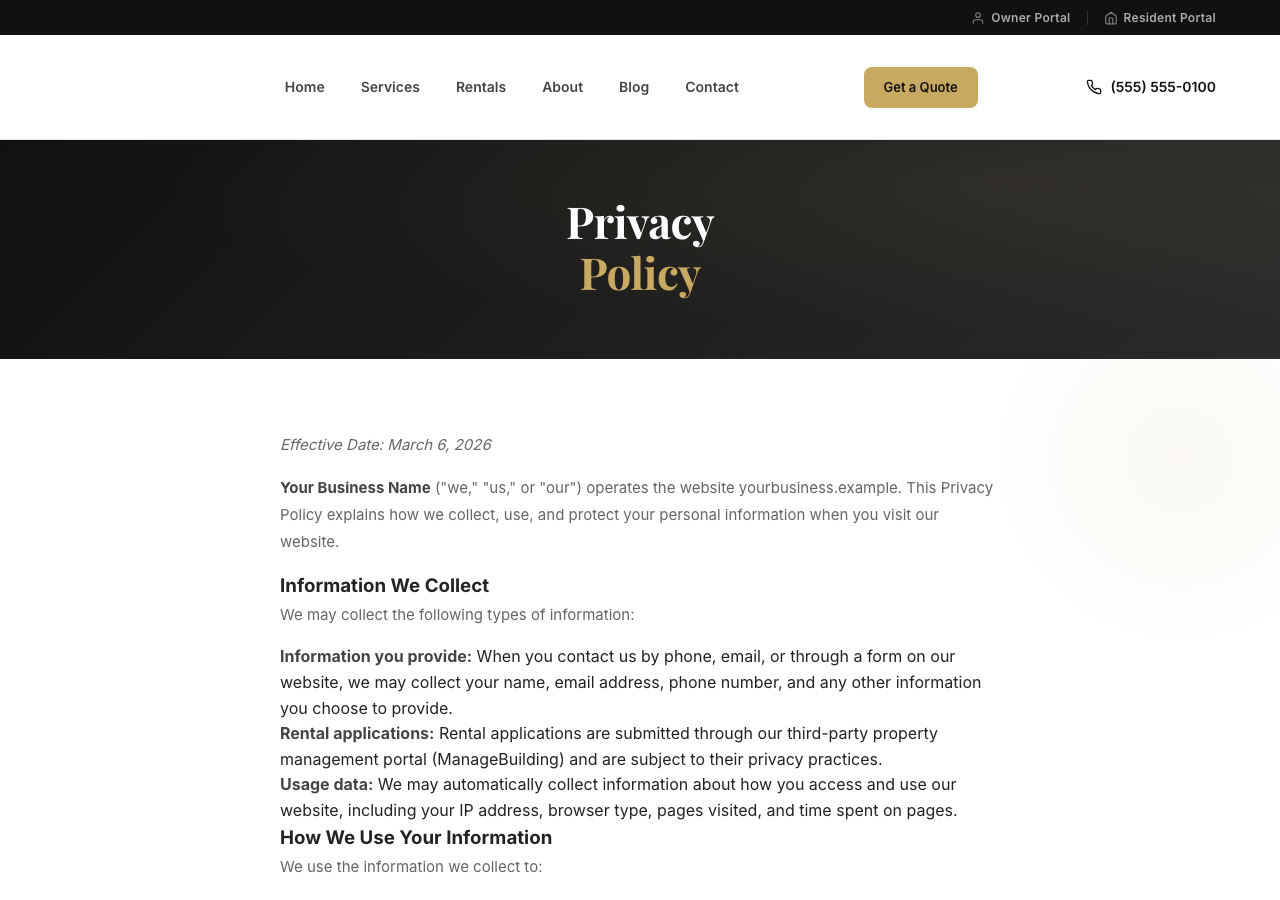
04 / Step two
The SMS terms page
A new page at /sms-terms. Six elements must be present: message types, frequency language, STOP, HELP with a real phone number, the carrier liability disclaimer, and a link back to the Privacy Policy. This block has all six. On that last one, a field-verified detail: the privacy policy reference must be a clickable hyperlink, not a text mention. Carriers flag the page without it, and spelling out the absolute URL in the visible text ( "review our Privacy Policy at https://yoursite.com/privacy" ) cleared the scanner on the first retry when a plain text reference had failed.
Effective Date: {{Date}}

By opting in to receive text messages from {{Business Name}}, you agree to receive informational and customer-service text messages related to our property management and rental services. Messages may include rental inquiries, property showing and application information, lease and move-in communications, maintenance updates, account or property information, appointment coordination, and other communications related to our services.

Message frequency varies based on your interactions with us. Message and data rates may apply.

Text STOP to opt out of SMS communications at any time. After opting out, you may receive a confirmation message and will no longer receive SMS messages unless you opt in again.

Text HELP for help or contact {{Business Name}} at {{Phone}}.

Carriers are not liable for any delayed or undelivered messages.

Your privacy is important to us. Please review our Privacy Policy at {{full URL, as a clickable link}}.

By opting in, you confirm that you are the account holder or have the account holder's permission to receive text messages at the number provided.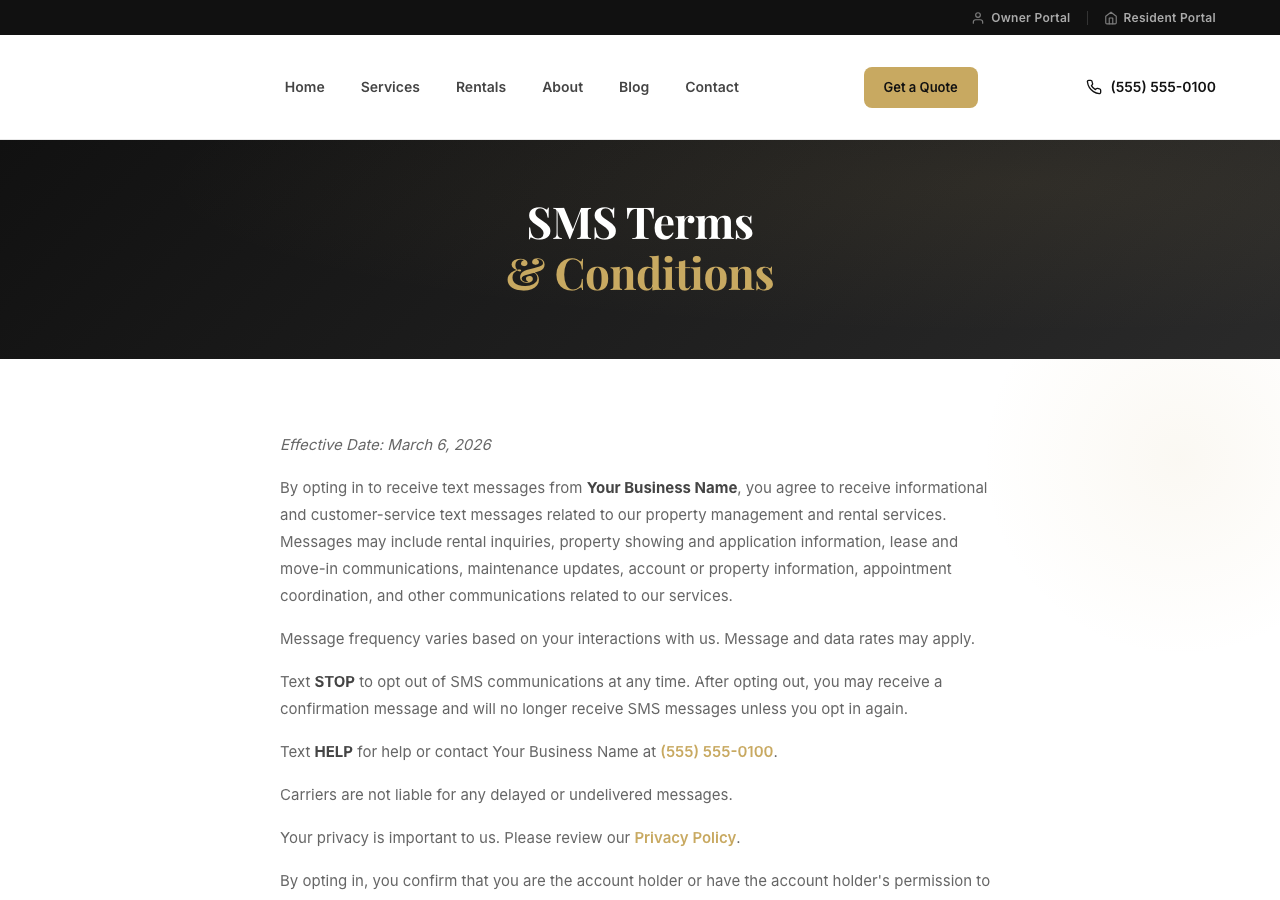
05 / Step three
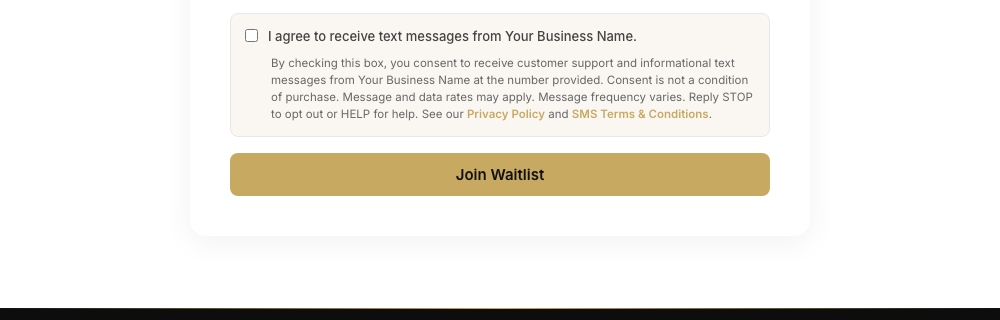
The consent checkbox, on every phone-collecting form
This is the piece reviewers reject most. The rules are non-negotiable:
- Unchecked by default, never pre-selected
- Optional: the form must submit normally with the box unchecked
- The disclosure text sits immediately below the checkbox
- "Privacy Policy" and "SMS Terms & Conditions" in the disclosure are live links to those two pages
[ ] I agree to receive text messages from {{Business Name}}.

By checking this box, you consent to receive customer support and informational text messages from {{Business Name}} at the number provided. Consent is not a condition of purchase. Message and data rates may apply. Message frequency varies. Reply STOP to opt out or HELP for help. See our Privacy Policy [link] and SMS Terms & Conditions [link].<div style="margin-bottom: 16px; padding: 12px 14px; background: #FAF7F2; border: 1px solid #eee; border-radius: 8px;">
<label style="display: flex; gap: 10px; align-items: flex-start; font-size: 0.85rem; font-weight: 500; cursor: pointer;">
<input type="checkbox" id="{{formPrefix}}SmsConsent" name="smsConsent" value="yes" style="margin-top: 3px; flex-shrink: 0;">
<span>I agree to receive text messages from {{Business Name}}.</span>
</label>
<p style="margin: 8px 0 0 26px; font-size: 12px; line-height: 1.5; color: #666;">
By checking this box, you consent to receive customer support and informational
text messages from {{Business Name}} at the number provided. Consent is not a
condition of purchase. Message and data rates may apply. Message frequency
varies. Reply STOP to opt out or HELP for help. See our
<a href="/privacy-policy">Privacy Policy</a> and
<a href="/sms-terms">SMS Terms & Conditions</a>.
</p>
</div>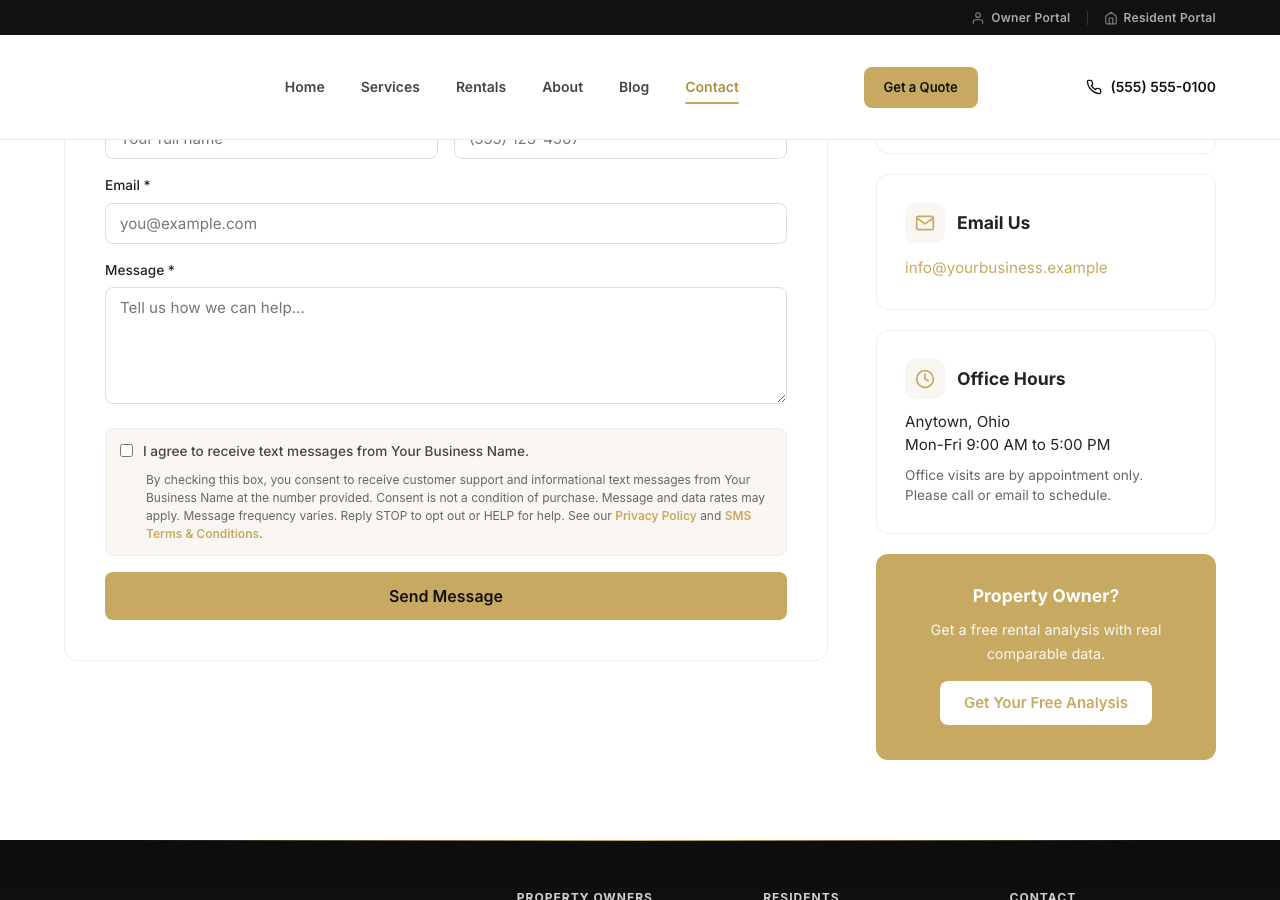
06 / The audit trail
Log the consent, not just the checkbox
Displaying the checkbox satisfies the reviewer. Logging when someone checked it is what protects the client later. Thread the consent value through the form handler and stamp it onto whatever record lands in the CRM.
// Read from form / JSON body
const smsConsent = data.smsConsent === true || data.smsConsent === 'yes';

// Build audit line
const smsConsentLine = smsConsent
  ? `SMS opt-in: YES on ${new Date().toISOString()}`
  : `SMS opt-in: NO`;

// Append to whatever text field lands in your CRM (notes/comments/message)
const messageWithConsent = (message || '') + `\n\n[${smsConsentLine}]`;body: JSON.stringify({
name: fd.get('name'),
email: fd.get('email'),
phone: fd.get('phone'),
message: fd.get('message'),
smsConsent: fd.get('smsConsent') === 'yes'
})Shortcut worth knowing
Forms that already use Netlify Forms with data-netlify="true" and no custom JavaScript capture the checkbox automatically through its name="smsConsent" attribute. No code changes, the value shows up in the form submissions dashboard. The wiring above is only needed for forms that POST JSON to a custom function.
07 / The sweep
Footer links, and the pages everyone misses
Every page's footer needs a link to /sms-terms next to the existing Privacy Policy link. On a static-HTML site that means a scripted pass over every page, not a hand edit.
Two traps from real implementations. Blog post templates often carry a different footer than top-level pages; a find-and-replace keyed to the main footer pattern will silently miss all of them, so script the injection per footer variant and count the files touched. And stripped-down pages, like a quote builder with a logo-and-phone footer, need a small secondary legal-links row added rather than a full footer rebuild.

08 / Before you submit
The pre-submission checklist
Run this before telling anyone to file the A2P registration. A rejection costs weeks; the checklist costs ten minutes. Or let the robot do the first pass: our free A2P checker tests your live site against all three requirements in thirty seconds.
- 01Privacy Policy carries the SMS section. The SMS/Text Messaging Privacy section is live and visible on the Privacy Policy page, including the no-third-party-sharing language for opt-in data AND the message frequency and rates disclosure. Automated checkers scan the live page for the frequency sentence.
- 02/sms-terms returns 200 with all six elements. Message types, frequency language, STOP instructions, HELP with a phone number, the carrier liability disclaimer, and a CLICKABLE Privacy Policy link (spell out the absolute URL; a text mention fails).
- 03All required language is visible rendered text. Open each page in a browser and read it. Scanners check the rendered page, not your HTML source: language inside hidden modals, collapsed accordions, or form markup does not count.
- 04Every footer links to SMS Terms. Sitewide, next to the existing Privacy Policy link. Check blog templates and stripped-down pages separately; they often use a different footer.
- 05Every phone-collecting form has the checkbox. Unchecked by default, with the full disclosure block immediately below it and working links to both legal pages.
- 06Forms submit with the box unchecked. Tested manually. Consent must be optional; a form that blocks submission without consent fails review and the consent it collects is worthless anyway.
- 07The backend logs the opt-in state. Optional for approval but recommended: a timestamped yes/no on every submission is your audit trail.
09 / After you submit
What actually happens after you file, and what to do when it stalls
Compliant site, registration submitted, then two weeks of "any day now." The vendor docs quote a range and stop there. Here is what actually shows up, from a September 2026 Aircall registration run for a real PM client, plus the two post-approval gotchas that eat the most support hours.
- Day 0 · 13:48 UTCClient submits the A2P10DLC form in Aircall.
- Day 0 · 13:48 UTCAircall auto-reply: brand created, waiting on Campaign Registry verification.
- Day 0 · 13:52 UTCAircall auto-reply: campaign created, waiting on carrier vetting. Quoted window: 5 to 20 open days.
- Day 2 · 19:26 UTCAircall email: brand and campaign approved by all Major Network Operators. Numbers listed. Outbound SMS available within 2-3 business days as carrier routing completes.
- Day 8Dashboard still shows the campaign as Submitted / Under review. Numbers still show Awaiting approval. Support ticket opened.
- Day 8 · +4 hoursAircall support finds one of the two numbers silently failed to register at the carrier despite the approval email. Re-registers it manually. Both numbers now Verified. SMS sends.
Compliant site helped: the review path never bounced back for a website issue. The routing lag and the stuck-number bug are the parts nobody warns you about.
Where to check status in Aircall
Two dashboards, not one. Both must be green before a text will actually send.
| Layer | Where | Green looks like |
|---|---|---|
| Campaign | Dashboard → Numbers → A2P Campaigns | Moves out of "Submitted for approval" into the "Campaigns" section with status Active. |
| Number | Dashboard → Numbers → select number → Registration Status tab | Per-number status shows Verified. |
The "Approved not Active" trap
Aircall emails the approval when the brand and campaign clear vetting. The dashboard does not update in lockstep with that email. Two independent stalls happen here:
- Carrier routing delay. Even after Aircall marks the campaign Active, individual numbers can sit at "Awaiting approval" or "Pending" for another 2-3 business days while the carriers finish routing. This is normal. Wait for it.
- Silent per-number registration failure. Sometimes an individual number never gets registered at the carrier even though the approval email lists it. The campaign shows Active. That specific number will not send SMS. A support ticket is the only fix; Aircall support manually re-registers the number.
Wait through the routing window first (the approval email says 2-3 business days, potentially same-day). If a specific number is still stuck a business day past that, treat it as the silent-failure case and open a ticket. Test SMS during the wait; sometimes sending works before the dashboard reflects it.
The support ticket that actually gets action
Aircall's in-app AI assistant will loop on "carrier reviews take 5 to 30 business days" until you hand it the approval email you already received. Skip the loop and open a human ticket with this template. The version below moved a real Sept 2026 ticket from "waiting" to "registered and sending" the same day.
Subject: A2P 10DLC Campaign Status Not Updated After Carrier Approval

Hi,

On {{approval-date}}, I received an email confirmation (Aircall ticket #{{ticket-number}}) stating that my A2P 10DLC registration was approved by all Major Network Operators for the following numbers:

  {{+1XXXXXXXXXX}}
  {{+1YYYYYYYYYY}}

Use case: Customer Care

The email indicated that outbound SMS would be available within 2-3 business days as carrier routing updates complete. It has now been {{N business days}}, and my campaign status in the Aircall Dashboard still shows as "Submitted" (under the "Submitted for approval" section with "Under review" status). The campaign has not moved to the "Campaigns" section with an "Active" status, and I am unable to send SMS messages.

Could you please investigate why the carrier routing update has not synced to my Dashboard and help resolve this issue?

Thank you.
Attach or paste the approval email, and screenshots of the Numbers tab and A2P Campaigns tab. Number Operations at Aircall can register the number directly once the ticket lands with the right context.
10 / Rejection fuel
What not to do
- Do not pre-check the box. Pre-selected consent is invalid consent and a standard rejection reason.
- Do not make consent required. If the form refuses to submit without the checkbox, the consent is coerced and the registration fails.
- Do not bundle marketing into the customer-service opt-in. Promotional texting needs its own separately collected consent checkbox. One box for both is a rejection and a liability.
- Do not trim the disclosure text. STOP, HELP, rate language, frequency language, and both legal links all have to be there. Shortened versions read cleaner and bounce.
- Do not hide the language in accordions, modals, or tabs. Reviewer scanners read the rendered visible page. Compliance text that lives in your HTML but not on the visible page fails with the message "detected on your live page, not your form text."
Done-for-you install / $499 flat
This page is the DIY version. The done-for-you version exists too. We install monday CRM + Aircall + DocRunner for $499.
One flat fee covers the whole working stack: your monday CRM boards built, the Aircall V2 integration installed and configured with the settings we recommend in these guides, numbers linked, and DocRunner wired in for document workflows. Setup work is typically completed in one business day; if you are porting existing numbers, carrier timelines apply and phones are typically live within a week.
Book your install slotCovers up to 5 users and 1 phone number, and assumes you already have an Aircall account and a monday.com account. If scoping shows you need more than this (number porting, department routing, automations, AI agents, or custom API work), the $499 credits toward the package that fits, so you never pay twice; the credit applies to a LaunchEngine package and is not refundable as cash. The $499 fee covers setup labor only. Aircall seats and usage are billed by Aircall directly; monday.com licenses are not included; DocRunner is $40/month after setup. Engagements are governed by our Terms. LaunchEngine is an Aircall partner and may earn referral commissions.
Related: the full Aircall + monday.com setup guide for the system this unblocks, and the phone scripts guide for what to say once the number is live.
About this SOP
This is the process LaunchEngine runs when onboarding property management clients to SMS through Aircall, shared as-is. It reflects carrier and platform requirements as of September 2026; registration requirements and reviewer behavior change, so verify against your platform's current documentation before filing. The copy blocks are starting points, not legal advice; have counsel review your privacy policy and terms. Screenshots and the After You Submit timeline reflect a real client implementation with client-identifying details replaced by placeholders. LaunchEngine is an Aircall partner and may earn referral commissions. Spot an error? Email rob@launchengine.com and we'll correct it. Last updated 2026-09-14 to add the post-submission playbook after a live Aircall approval-but-not-active support case.
FAQ
Common questions about A2P 10DLC registration for property managers.
Never think about carrier compliance again
When LaunchEngine runs your website, A2P compliance is included, along with hosting, edits, and an owner-acquisition site built to win doors. This page becomes our problem.